I wanted a very small thing: I should be able to send Hermes an X link from Telegram and have it open the link and read it.
Hermes’s browser-use tool gives it a disposable browser environment. it is a fresh, managed browser session that is thrown away after use. That browser got blocked by X before it even reached the login page:
Access to x.com was denied
HTTP 403
At the same time, a normal HTTP request from the same VPS could reach X’s login flow with a 200.
This points to the browser environment being flagged - which is likely a combination of an automated-browser fingerprint, a fresh profile, and/or datacenter IP reputation. It isn’t a basic network/DNS outage or an account problem.
That was my inference, not something I could prove from one 403. But it gave me a much better next thing to try.
The persistent-browser hypothesis
Instead of starting from a blank browser every time, I wanted to try a dedicated, long-lived Chrome profile on the VPS.
The experiment was simple:
- persistent on-disk cookies and session state;
- a separate X account for Hermes;
- Any messaging gateway ( Telegram for now ) → Hermes → the same browser profile for every X link.
A persistent profile does not magically change a VPS’s IP reputation or make browser automation acceptable to X. It was just a more normal browser environment to try.
Giving Hermes a way to control it
If Hermes was going to use a persistent Chrome instance, it needed a private way to control it.
Chrome exposes the Chrome DevTools Protocol. I bound it to 127.0.0.1:9223, which means only processes already on the VPS can connect to it.
Telegram → Hermes gateway → CDP commands → Chrome → logged-in X profile
CDP is browser-control authority, not a read-only API. Keeping it on loopback means it does not become a public remote-control port.
First attempt: Chrome for Testing
The first implementation was Chrome for Testing unpacked under my home directory. The VPS already had Xvfb, so Chrome could get a virtual display without a physical desktop.
Chrome did not start:
No usable sandbox
Chrome uses a Linux process sandbox for web renderers. The VPS allowed unprivileged user namespaces in principle, but AppArmor, Ubuntu’s application-confinement security system, restricted ordinary users from creating the child user namespaces Chrome expected for its child renderer processes. The downloaded Chrome-for-Testing build also did not give me a clean fallback sandbox configuration.
There were some deceptively easy answers:
- run Chrome as
root; - add
--no-sandbox; - keep loosening host restrictions until it starts.
None of those were good answers. A browser renders untrusted pages. Running it as root expands the blast radius, and disabling the sandbox removes an important isolation layer.
The setup that made sense
The safer shape was:
- root installs the official packaged Chrome build once;
- a dedicated Unix user owns only the persistent Chrome profile;
- Chrome still uses its normal renderer sandbox;
- Hermes controls it only through loopback CDP.
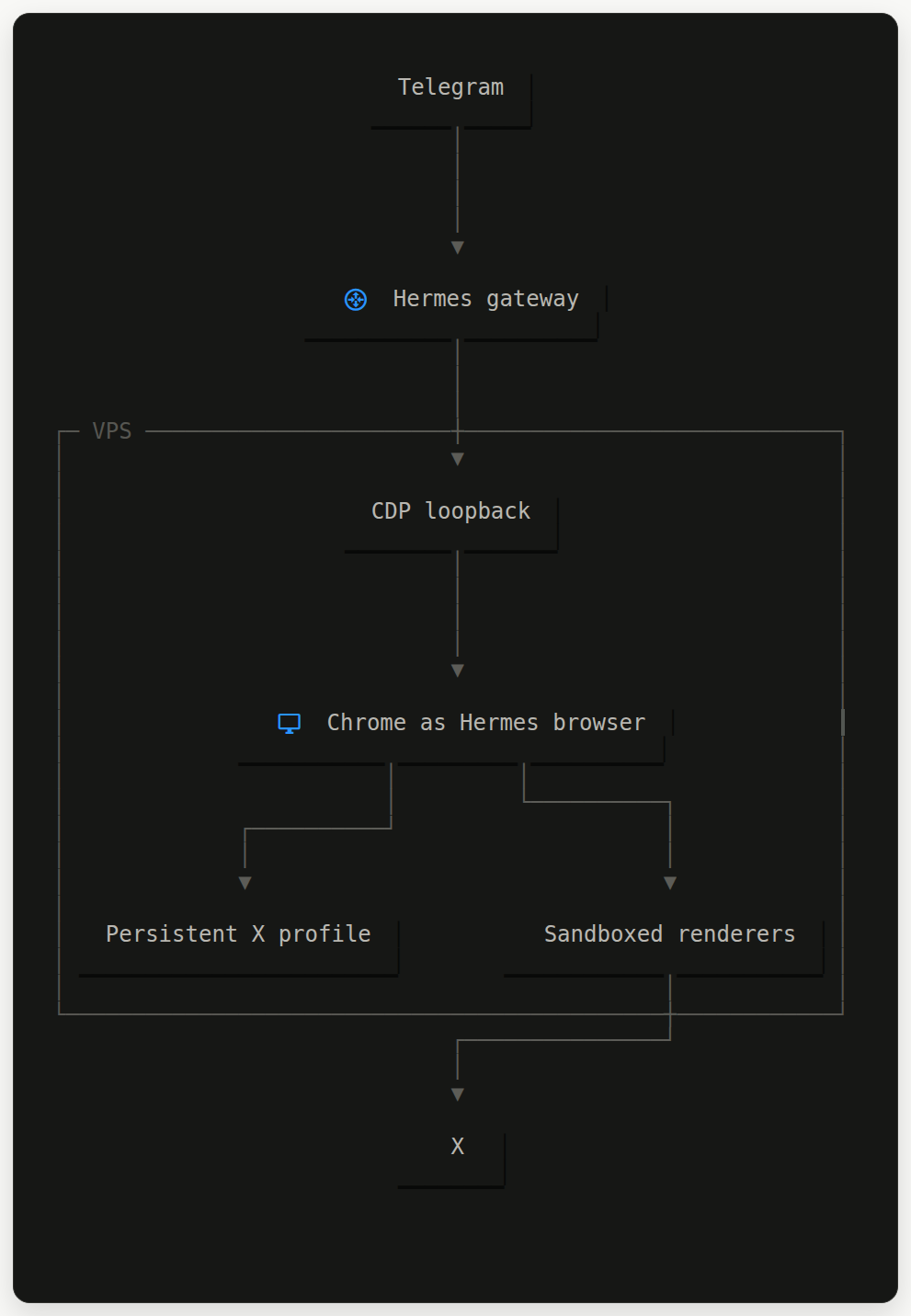
The official packaged Chrome build gives Chrome the vendor-maintained, root-owned sandbox helper it expects. Root installs and configures the machine once; it does not own the browsing session.
setup script: Set up persistent sandboxed Chrome with loopback-only CDP
The script creates a dedicated agent-browser Unix user, keeps the profile under /var/lib, runs Chrome through Xvfb, and binds CDP only to 127.0.0.1:9223.
One small Xvfb gotcha
The first systemd service installed and restarted correctly, but Chrome still exited with:
Missing X server or $DISPLAY
There was a lot of DBus noise in the logs, but that was incidental. The actual issue was the inline xvfb-run invocation in ExecStart.
Moving the Xvfb invocation into a small root-owned launcher made the systemd service simple and gave Chrome a usable display.
It finally worked!
After installing official Chrome and fixing the Xvfb launcher, the browser service exposed CDP at 127.0.0.1:9223.
Hermes attached to that endpoint and reached X’s actual login and onboarding page from the persistent profile. Once the profile had been authenticated, Hermes could open X links through that same persistent browser session.
What I would keep in mind
This is not a recipe for bypassing a platform’s rules or bot detection. A persistent profile does not change a VPS’s IP reputation and does not guarantee any site will accept automated browsing.
It also needs ordinary operational care: browser updates, service health checks, session expiry, and a way for the owner to complete future verification when a site asks.
Still, the final shape is pleasantly simple. Keep Chrome sandboxed. Do not run it as root. Give its profile its own Unix user. Keep CDP private to loopback. Treat browser state as sensitive. Then make the whole thing boring enough that sending a link from Telegram just works.